Skip to product information
1 of 3

DeskUp Pro Flexispot

DeskUp Pro Flexispot

Control your standing desk from a smart home automation system

Regular price £60.00 GBP
Regular price £60.00 GBP Sale price £60.00 GBP
Sale Sold out
Shipping calculated at checkout.
Quantity

✔ Hand assembled in the UK

✔ Tested prior to shipping so we know it will work when you receive it

If your Flexispot standing desk controller has a spare RJ45 port use DeskUp Pro Flexispot to integrate your desk with Home Assistant to control your standing desk from your phone, dashboards, automations or voice.

Why do I need a DeskUp Pro Flexispot?

Sitting down at your desk too long isn't good for you, use the DeskUp Pro Flexispot and your smart home to remind you to stand, or do more with it such as:

  • If you've been sat down too long:
    • Automatically raise the desk to standing height.
    • Announce on a smart speaker you have been sat down too long.
    • Or maybe flash a light
    • If you ignore it then 5 mins later have it nag you to stand up until you do!
  • After lunchtime raise the desk so you start the afternoon standing up (maybe trigger this as you walk into the room if you have a motion sensor).
  • Prefer to do meetings standing up, then if your calendar is exposed to your smart home system you could raise the desk 1 minute before your meeting starts.
  • Control your desk with Home Assistant's Assist, Google Home or Alexa (if your smart home system supports these)
  • At the end of the working day when you turn a smart light off or press a smart button automatically lower your desk.
  • If you work at a company maybe you could automatically raise all the desks in the office to help the cleaners vacuum underneath easier.

Why buy from us?

  • Certified components from trusted suppliers are used to ensure reliability.
  • We use every product we sell in our homes too.
  • DeskUp Pro is only sold by us.


View full details

This product is coming soon

Current development status

We have successfully tested our proof of concept device on 2 Flexispot desks and it more than met our expectations. 

We are now actively building the version to ship but don't have a date yet, although we are hoping to ship before end of 2026. 

Once we have a better shipping estimate we will start accepting preorders on here, until then we invite you to sign up to be notified when the device is available to order.

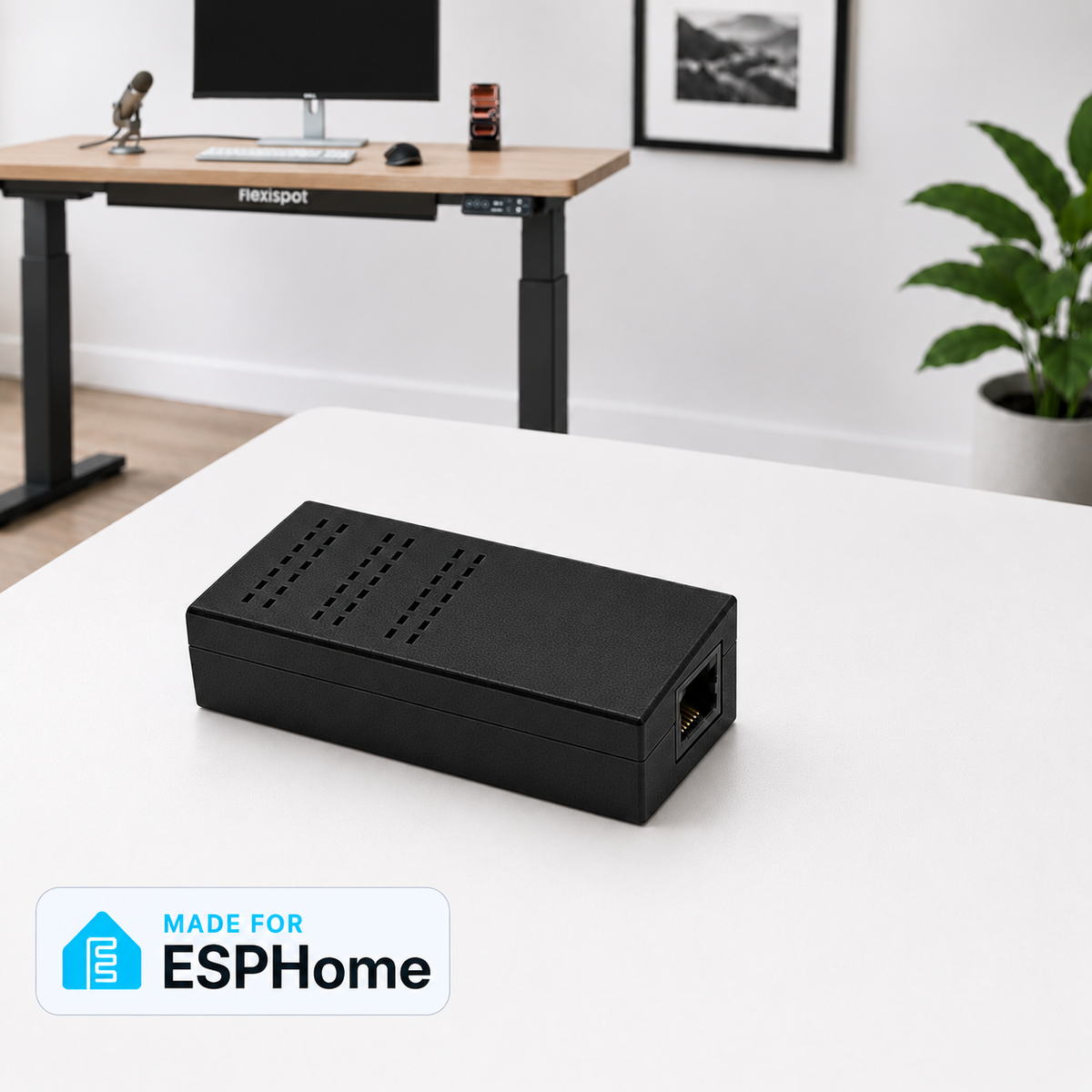
Note: The case design shown may change slightly whilst its under development. 

We will continue to update this page as the product evolves.

Update 9th Oct: The 1st PCB for the version to ship is built and we are testing it whilst we finalise the case design. 

  • Compatible Desks & Controllers

    These desks are confirmed as working: 

    • E7 Mini (2026)
    • E7 Pro (2026)
    • E7Q

    With controllers:

    • CB38M2M(IB)-1 with keypad HS13G-1
    • CB38M2M(IB)-4 with keypad HS13G-1
    • CB38M4A(IB)-1 with keypad HS13G-1
  • Desks very likely to be compatible

    Desks in this section haven't been tested with the DeskUp Pro yet but we believe they will be compatible:

    • Any 2026 E7 model (with a spare RJ45 port) e.g Standard/Series, Plus, Flow
    • E7 Pro Plus
    • E5B

    Controllers:

    • CB38M2J(IB)-1 with keypad HS13B-1
    • CB38M2L with keypad (HS13M-1C0, HS36B-1)
    • CB38M2A-1 with keypad HS01B-1
    If you try the DeskUp Pro Flexispot on a desk that is not in the compatible section we'd love to add it and as a thankyou we have a cashback offer for you, see the 'compatibility notice' section below.
    • EK5 - Controller CB38M2B(IB)-1 and keypad HS13A-1 (has different wiring).
    • E1 Pro
    • E5 Standard
    • Any desk without 1 spare RJ45 socket

Compatibility Notice - Please Read Before Buying

There is no guarantee that the DeskUp Pro Flexispot will work with your desk as Flexispot could change their specifications (although that's unlikely if its in the lists above).

Your desk must have a free RJ45 port on the controller (8 pins).  Usually the controller will indicate an RJ45 with an 'HS' next to it.

It's your responsibility to determine if it's fit for your purpose before purchasing.

Every desk known to us that works or doesn't is in the lists above.  If your desk is not on the list we cannot advise on its compatibility until someone tries it and tells us. Where controller model numbers are similar there is a high chance of compatibility.

Cash back - If you try DeskUp Pro Flexispot on a desk that is not in our compatible list you could get cash back, see this page for details.

What if it doesn't work on my desk?

If your desk has a spare RJ45 port, is not in our compatible list and the DeskUp Pro does not work on it then we will accept a return within 15 days of delivery. We will ask for your controller and handset model numbers so we can update the not compatible list. The cost to you will just be the postage, we will refund the device cost shown on the order once we have checked it is in a resellable condition.

  • With each DeskUp Pro Flexispot

    You receive:

    • 1 x DeskUp Pro Flexispot
    • 1 x RJ45 20cm Cable
    • Getting started guide
    • Online documentation
    • Access to Home Assistant example dashboard 

    Before shipping we:

    • Test it works on our desks
    • Reflash prior to shipping
  • Controls

    Use these to control your desk from your phone, dashboards or execute them within automations.

    Full Documentation is on GitHub 
  • Sensors

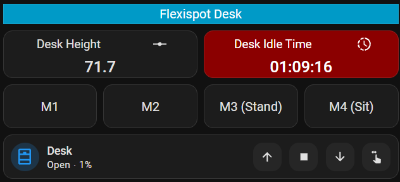
    Displays the desk height in real-time, press a physical desk controller button and watch the height sensor change.

    Also shows how long the desk has been idle for.

    Full Documentation is on GitHub 
  • Cover Control

    Allows you to move the desk to a position just by sliding the control with your finger.

    It can also be exposed to Google Assistant and Alexa for voice control (if your smart home hub supports this).

  • Configuration

    Used to fine tune your DeskUp Pro Flexispot to your desk.

    Full Documentation is on GitHub 

Create Dashboards

Create custom dashboards in Home Assistant to show your desk's status and control it.  This one turns red after the desk is idle for 30 minutes.

We give you this one on GitHub to get you started.

Near Real-time updating

Press either the physical desk buttons or the buttons in Home Assistant and everything updates the desk's height in near real-time. 

Technical Specs

Feature Details
Connectivity 2.4Ghz Wi-Fi 6, Has a USB-C port for setup
Enclosure 3D Printed Case
Firmware ESPHome (Open source available on Github)
Microcontroller Seeedstudio XIAO ESP32-C6
Smart home compatibility Home Assistant

Easy to setup

Initial setup of the device to connect it to Wi-Fi can be done by:

  • Using a USB-C cable that supports data (not supplied) and connecting it to a laptop and following the provided instructions.
  • Bluetooth BLE (if your Home Assistant instance already has Bluetooth it will be automatically detected and connected).

Shipping

  • We ship internationally from the UK using tracked services to give you peace of mind.
  • Orders with stock available are usually dispatched in 1 to 2 working days.
  • Pre-order items will be shipped to you as soon as we receive the stock, but if you order one as part of your order the whole order will be shipped together.
  • International buyers are responsible for any import taxes or customs charges applied by their country.
  • Thing Too Tech

    Five Years, Five Hours Standing. Then I Got a FlexiSpot and Made It Smart

    Article by Abe 

Why did I create the DeskUp Pro?

I originally wrote the DeskUp Pro RJ12 version because I was finding I sat down at my desk too much and this was causing Sciatica so I wanted to integrate the desk into my Smart Home System and have Alexa nag me to stand up more! And it helped.

My partner then said they wanted a standing desk for similar reasons so I thought why buy the same desk when I can do another project with a Flexispot desk whilst trying to retain as many features as possible from the original Desk Up Pro and that became the DeskUp Pro Flexispot.

As before I open sourced the project on GitHub and decided to build and sell these so you can benefit too. 

I hope you enjoy and benefit from the device as much as we have.