Skip to product information
1 of 7

DeskUp Pro v2

DeskUp Pro v2

Control your standing desk from a smart home automation system

Regular price £58.00 GBP
Regular price Sale price £58.00 GBP
Sale Sold out
Shipping calculated at checkout.
Type

✔ Hand assembled in the UK

✔ Tested prior to shipping so we know it will work when you receive it

Control your standing desk with the DeskUp Pro

Compatible desks include Maidesite, Desktronic, Boho, Jiecang, Desktopia, IKEA, Omnidesk, Fully Jarvis, Vari Desk, Hibitaro!

If your standing desk controller has an RJ11 / RJ12 port use the DeskUp Pro to integrate your desk with your smart home automation system and control your desk from your phone, dashboards, automations or voice.

 Why do I need a DeskUp Pro?

Sitting down at your desk too long isn't good for you, use the DeskUp Pro and your smart home to remind you to stand, or do more with it such as:

  • If you've been sat down too long:
    • Automatically raise the desk to standing height.
    • Announce on a smart speaker you have been sat down too long.
    • Or maybe flash a light
    • If you ignore it then 5 mins later have it nag you to stand up until you do!
  • After lunchtime raise the desk so you start the afternoon standing up (maybe trigger this as you walk into the room if you have a motion sensor).
  • Prefer to do meetings standing up, then if your calendar is exposed to your smart home system you could raise the desk 1 minute before your meeting starts.
  • Setup a dashboard on your smart home system so you can have an unlimited number of preset height buttons e.g. maybe each family member prefers a different sit & stand desk height.
  • Control your desk with Home Assistant's Assist, Google Home or Alexa (if your smart home system supports these)
  • At the end of the working day when you turn a smart light off or press a smart button automatically lower your desk.

Preorders

  • Are expected to ship by end of August 2026.
  • As of 4th August the case shown is now the one we will be shipping.
  • We invite you to pre-reorder v2 to secure yours first, you can cancel anytime prior to shipping.

Why buy from us?

  • Certified components from trusted suppliers are used to ensure reliability.
  • We use every product we sell in our homes too.
  • DeskUp Pro is only sold by us.
View full details
  • Maidesite Desks

    The Maidesite Premium Controller (which the DeskUp Pro was originally written for) comes with these desks:

    • TH2 Plus Art
    • T2 Pro
    • T2 Pro Plus
    • SC2 Pro
    • EL2 Pro Art
    • EL2 Plus Art
    • S2B Pro

    The Maidesite Standard controller which comes with these desks:

    • T1 Pro
    • SN1

    Note: Maidesite have changed the Standard controller in a version manufacturered in July 2025 and removed the RJ12 port, so check the back of the controller.

  • Other Desks & Controllers

    • Desktronic Home One - which uses a Jiecang JCB36NE2 control box.
    • Desktronic Pro
    • Boho Office Basic Line - which uses a Jiecang JCB36N2HAG-230 control box.
    • Jiecang JCHT35K72C - Preset buttons & sensors on this controller have been confirmed as working, but using the height control slider to set the height to a specific value doesn't work. Its likely this controller doesn't support this capability.
    • Desktopia Pro X
    • IKEA Uppspel
    • Jiecang JCB35M11C
    • Jiecang JCHT35K9-003-v4 used on a Desky Duel Sit Stand Frame
    • Omnidesk
    • Fully Jarvis with a Jiecang JCB36N2CA-230 Controller - Preset buttons & sensors on this controller are confirmed as working, but 1 user reported that using the height control slider to set the height to a specific value didn't work for them. Other users were fine.
    • Vari Desk Essential
    • Hibitaro Komfort M708 with a Jiecang JCB36NE2A-230 controller

    Any desk with an RJ11/RJ12 port could work and quite likely any Jiecang controller

    • IKEA Mittzon
    • Vonhaus desk with controller model: M200-23-CH, M150-22-PJ
    • Eureka Ergonomics desk with control box: erk-cb-2m-bca84a
    • Fezibo

Compatibility Notice - Please Read Before Buying

Desk manufacturers could change their internal electronics and software at any time, even on the same model number.  However so far we've only seen Maidsite remove the RJ12 port on one controller model and have had no reports of anything else on the list above not working. 

But because this product is based on reverse engineering until you try it on your desk there is no 100% guarantee that it will or won't work. 

It's your responsibility to determine if it's fit for your purpose before purchasing - therfore returns are not accepted.  Where we know of limitations we have mentioned them above and on our GitHub page.

Every desk known to us that works or doesn't is in the lists above.  If your desk is not on the list we cannot advise on its compatibility until someone tries it and tells us.

  • Fully Assembled

    • Assembled by us
    • Tested on our desks
    • Flashed prior to shipping

    You receive:

    • 1 x DeskUp Pro assembled
    • 1 x RJ12 Cable
    • Getting started guide
    • Online documentation
    • Access to Home Assistant exmple automations & dashboard
  • DIY Kit 1 (no case)

    You need to assemble the device to do this you receive:

    • 1 x PCB
    • 1 x SeeedStudio ESP32-C6 with header pins
    • 1 x RJ12 female socket
    • 2 x 6cm RJ12 cable
    • 4 x RJ12 connectors
    • 1 x Sticker
    • Assembly instructions
    • Online documentation
    • Access to Home Assistant exmple automations & dashboard

    Note: You only need to make 1 cable but we give you a spare just in case you need it.

    You will need to provide:

    • Soldering Iron
    • RJ12 Crimping tool
    • Wire stripper
    • RJ12 Cable tester
    • Design & 3D print or buy your own case
    • Flash the device
  • DIY Kit 2 (with case)

    You need to assemble the device to do this you receive:

    • Everything in DIY Kit 1
    • Plus the same 3D printed case we use on our assembled product
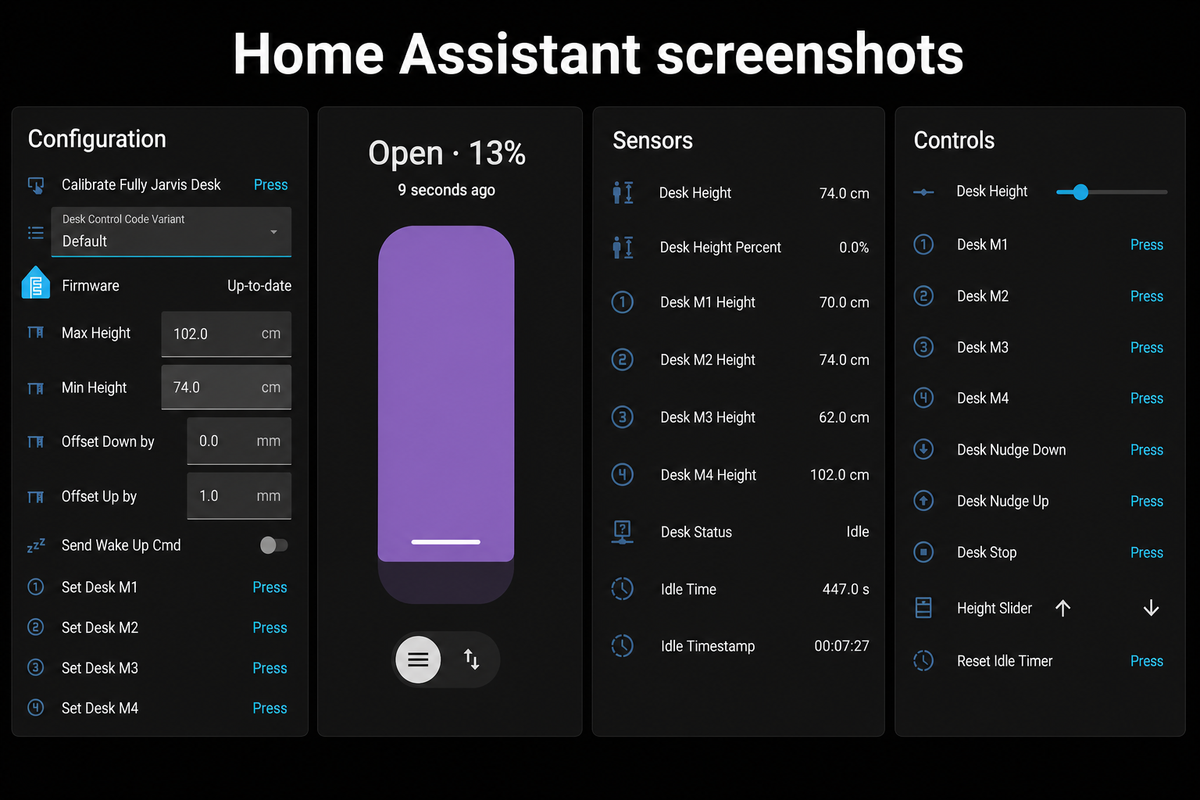
  • Controls

    Use these to control your desk from your phone, dashboards or execute them within automations.

    Full Documentation is on GitHub 
  • Sensors

    Displays the desk height in real-time, press a physical desk controller button and watch the height sensor change.

    Also shows the desks 4 memory preset heights and how long the desk has been idle for.

    Full Documentation is on GitHub 
  • Cover Control

    Allows you to move the desk to a position just by sliding the control with your finger.

    It can also be exposed to Google Assistant and Alexa for voice control (if your smart home hub supports this).

  • Configuration

    Used to fine tune your DeskUp Pro to your desk.

    Full Documentation is on GitHub 

Create Dashboards

Create custom dashboards in Home Assistant to show your desk's status and control it. This one turns red after the desk is idle for 30 minutes.

We give you this one on GitHub to get you started.

  • Controls

    Use these to control your desk from your phone, dashboards or execute them within automations.

  • Sensors

    Displays the desk height in real-time, press a physical desk controller button and watch the height sensor change.

    Also shows the desks 4 memory preset heights and how long the desk has been idle for.

  • Cover Control

    Allows you to move the desk to a position just by sliding the control with your finger.

  • Configuration

    Used to fine tune your DeskUp Pro to your desk.

Create Dashboards

Create custom dashboards in Homey Pro to show your desk's status and control it.

  • REST API

    Any Smart home hub that can send Rest Api requests such as:

    • Homey Pro
    • Samsung Smartthings using web requester
    • Apple Homebridge with http-webhooks
    • Hubitat
    • Probably others

    Using the api is fairly simple if your using a Smart Home hub that can send local (on your house network) rest api calls.

    Full Documentation is on GitHub 
  • Built in Web Interface

    Use the built in Web Interface to see sensor values and control your desk.

  • Configuration

    Use the built in Web Interface to fine tune your DeskUp Pro to your desk.

    Full Documentation is on GitHub 

Videos

Near Real-time updating

Press either the physical desk buttons or the buttons in Home Assistant/Homey Pro or the web interface and everything updates the desk's height in near real-time.

Use Voice Assistant's

Control your desk with your voice!

Home Assistant supports: Alexa, Google Assistant and Assist.

Homey Pro supports: Alexa and Google Assistant.

Enable sound when watching the video to hear Alexa raise the desk and Google lower it

  • 8.8cm Length

    2.6cm Width

    2cm Depth

Technical Specs

Feature Details
Connectivity 2.4Ghz Wi-Fi 6, Has a USB-C port for setup
Enclosure 3D Printed Case
Firmware ESPHome (Open source available on Github)
Microcontroller Seeedstudio XIAO ESP32-C6
Power Powered by the desk's controller over the RJ12 Cable, no USB cable is needed to power it
Smart home compatibility Home Assistant, Homey Pro, and any smart home hub that can make a Rest APi request

Easy to setup

Initial setup of the device to connect it to Wi-Fi can be done by:

  • Using a USB-C cable that supports data (not supplied) and connecting it to a laptop and following the provided instructions.
  • Bluetooth BLE (if your Home Assistant instance already has Bluetooth it will be automatically detected and connected).

When you receive your DeskUp Pro you will also have access to online setup documentation, a sample Home Assistant dashboard and example Home Assistant automations.

Shipping

  • We ship internationally from the UK using tracked services to give you peace of mind.
  • Orders usually dispatched in 1 to 2 working days.
  • Pre-order items will be shipped to you as soon as we receive the stock, but if you order one as part of your order the whole order will be shipped together.
  • International buyers are responsible for any import taxes or customs charges applied by their country.

Why did I create the DeskUp Pro?

I was finding I was sitting down at my standing desk too much and this was causing Sciatica so I wanted to integrate the desk into my Smart Home System and have Alexa nag me to stand up more! And it helped.

So I open sourced the project on GitHub and decided to build and sell these so you can do the same.

I hope you enjoy and benefit from the device as much as I have.

What our customers have said about DeskUp Pro v1 & v2